
Let’s talk about Pname com Facebook orca folder. What the folder does, why you should not delete it, and why it keeps coming even when you delete it.
It took me roughly a month to fix the Facebook error message “Pname com Facebook orca on my Infinix smartphone.
So, here in this epistle, I’m going to share with you all the steps I followed to clear the error and restore all deleted messages on my Facebook account. And why you should bother less about the com.facebook.orca file.
Table of Contents
What is com.facebook.orca?
The pname.com.facebook.orca is a folder created when the Facebook messenger app is installed on a smartphone. This folder includes the home folder, katana folder, and the orca folder. Each folder work for a different purpose.
These three packages are needed to make the Facebook app and the Facebook messenger app [APK] run smoothly.
When you check your Facebook installation file on either app manager or file manager explorer and see “com.facebook.com, com.facebook.katana, and com.facebook.home” folders just know that they are necessary files for the Facebook app and Facebook Messenger app to work perfectly.
com.facebook.katana?
Katana is the name of the tasks application used on Facebook. The package katana came from Cortana but due to policy violation and the name to change the com.facebook.facebook.package name to a unique folder name, Kanata was chosen over Cortana.
The com.facebook.katana folder contains the Facebook app itself. In the real sense, you don’t have to worry or do anything about the Katana folder. Whether you delete the Katana folder or not, the folder will be recreated again as soon as you launch the Facebook app as it’s an important part of the Facebook app to work.
Is com Facebook Orca A Malware?
The Orca folder may look like malware but it’s not. The Orca folder is a normal folder that is created on your device when you install Facebook messenger and automatically deleted when you delete the Facebook messenger app.
It’s a folder that contains an integral part of the Facebook Messenger app to make the messenger app function very well. The folder also contains all deleted conversation on Facebook messenger.
At the end of this article, you will see why you should not delete the com.facebook.orca folder and how to retrieve deleted Facebook messages using the orca folder and any Android file manager.
Pname.com.facebook.orca has Stopped?
It’s quite unfortunate when you see the pop up that “Sorry! The application messenger (process com.facbook.com) has stopped unexpectedly. Please try again” and discover there is nothing you can do to solve the problem.
The error message could even be unfortunately sense home has stopped working.
While most users are less concern about this message, they click on please try again to see whether that will end the problem. Yet, the com.facebook.orca will remain on the screen of the device. However, in a nutshell, the message really worth your attention.
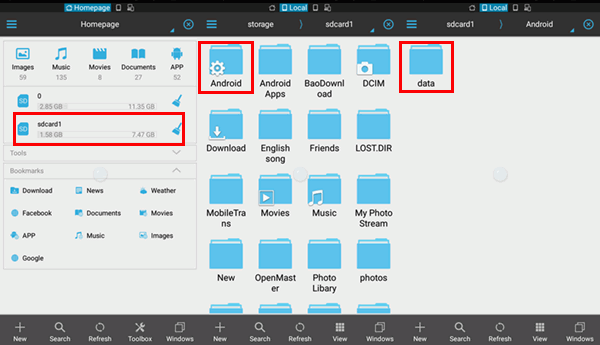
However, uninstalling and reinstalling Facebook messenger app will not solve the problem. The Facebook orca folder will still come back when you reinstall the Facebook app.
Fix Pname com Facebook Orca on Android
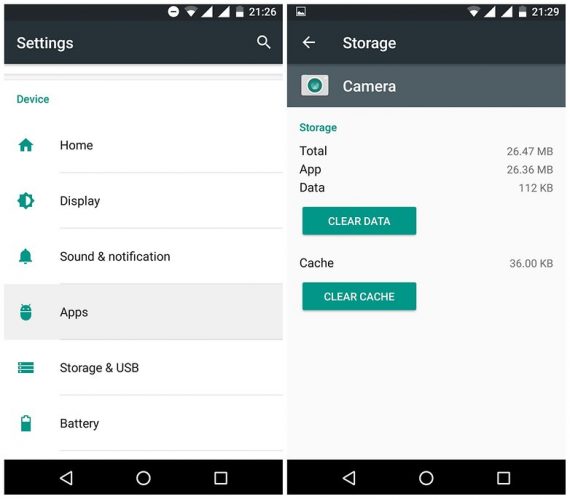
Here is how to fix Pname com facebook orca error on android
- Go to Phone Settings
- Application option
- All Apps
- Click on the Facebook app
- Clear the data.
The above steps are how to fix Pname com facebook orca error on android
If you have any problem with this guide please use the comment section. Do not forget to share with your friends if this article has helped you to fix Pname com Facebook orca error as a result fo com.facebook.orca caches.



So educating. Thank you sir
The Pname com Facebook orca error has given me a lot of headache. After a long search, this guide helped to solve the error. Thank you sir
Hi Ayoola,
Woow! Thanks for the positive response.
The solution I av been looking for, thank for this, it really worked. More kudos to you bro.
Hi Tolulope,
I am glad that this post finally helped you to solve the long-term issue.
This is awesome,
I never observed this all this while, am just getting to know , thanks to your enlightenment.
Please keep up this awesome piece of work.
Hi Prince,
Thanks your comment we do really appreciate you for your time.
Really appreciate this so much. It will help so many people. Thanks…
Hi Babarinsa,
Hope this helpful
Hi Babarinsa,
Thanks for your comment. We are glad we are able to help.
Your post made my week. I’have been searching for this for the past one month without any result. How I wish you have a donate button, a cup of cofee wouldn’t have been a bad idea .
Hi Brown,
Hahaha…. That sounds great though. Please do let us know whether the Pname com Facebook orca error no longer resurface again after implemented this tutorial
thanks to the author, av seen the error and was wondering how it will be cleared, i believed this will surely help. thanks a bunch
Definitely yes… This will clear the Pnamecom Facebook orca without deleting the orca folder or the katan folder. With this you do not uninstall the Facebook Messenger app